
Drawing Register 2.0
Redesigning the experience from an information graveyard to an active collaboration hub

Business Background
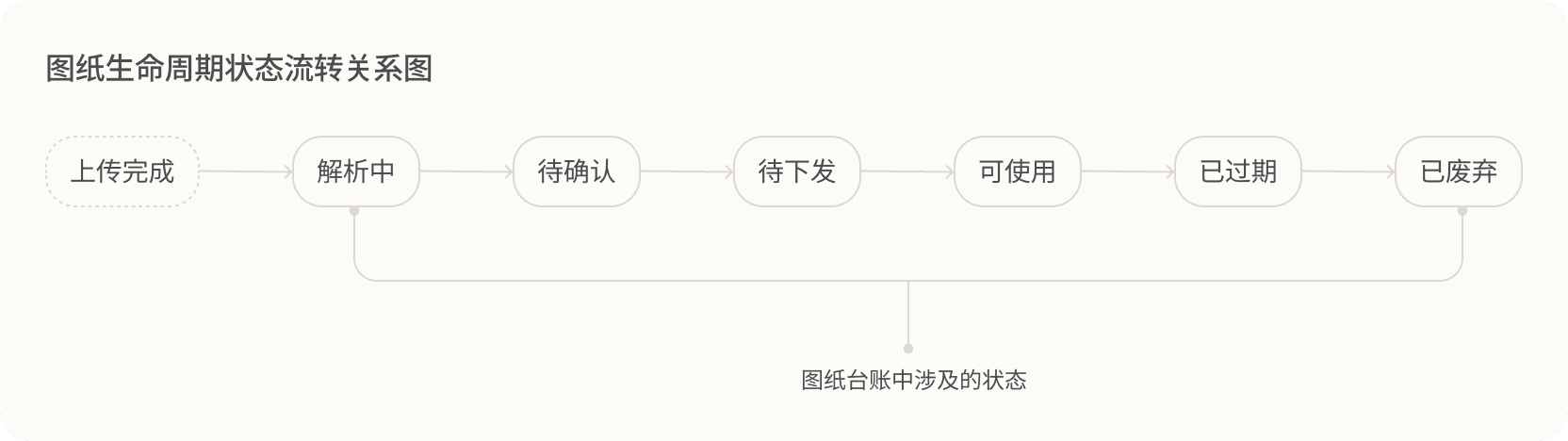
The drawing register records how drawings move through their lifecycle from upload completion to deprecation. The register mainly involves four user roles: uploader, confirmer, releaser, and multi-permission administrator.
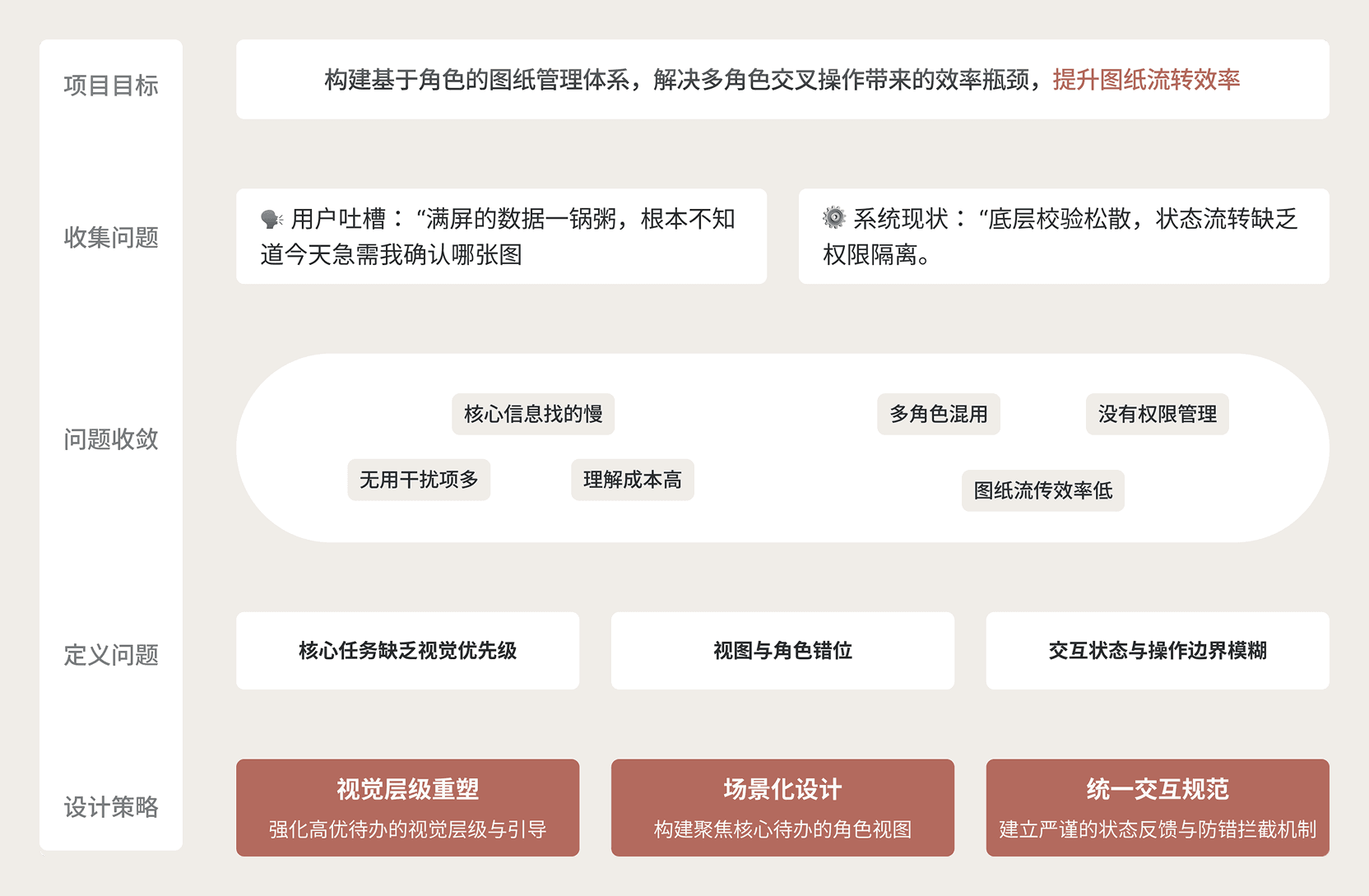
The Drawing Register 1.0 design had been completed before I joined the design team. Its core goal was to quickly build and launch the drawing module, so it did not differentiate by user role. As a result, different users had high comprehension costs in a complex information flow, and some operation paths were lengthy, which seriously affected drawing circulation efficiency.
Problem Definition and Analysis

Users, Scenarios, and Tasks
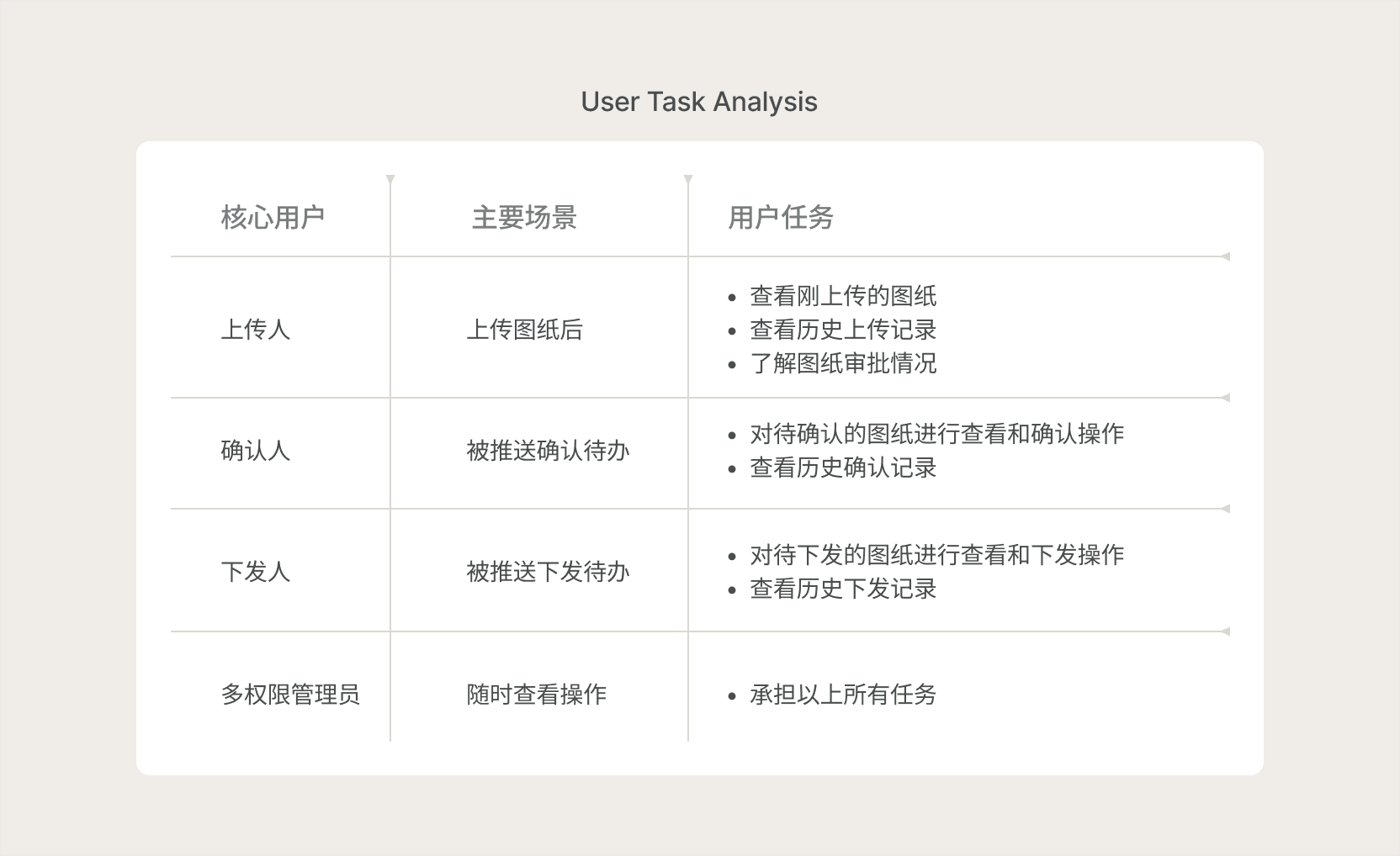
According to JTBD, users are not buying the product itself; they are hiring it to complete a task. So which users is the drawing register really helping, and what tasks are they trying to complete?
Design Analysis
After clarifying the target users and usage scenarios, the next step was to analyze the requirements systematically.
Design Solution
Strategy 1: Reshape visual hierarchy
A blended task-area + table view places the data table below and the task area above, improving information retrieval efficiency and attention management.
- Keep the table: preserve user habits and retrieval efficiency for large data sets
- Add a task area: deliver role-specific views by placing what each role needs most in the most visible position
- Engineering-friendly: low interface change cost, no full rewrite of underlying logic, and high ROI

Strategy 2: Role-based scenario design
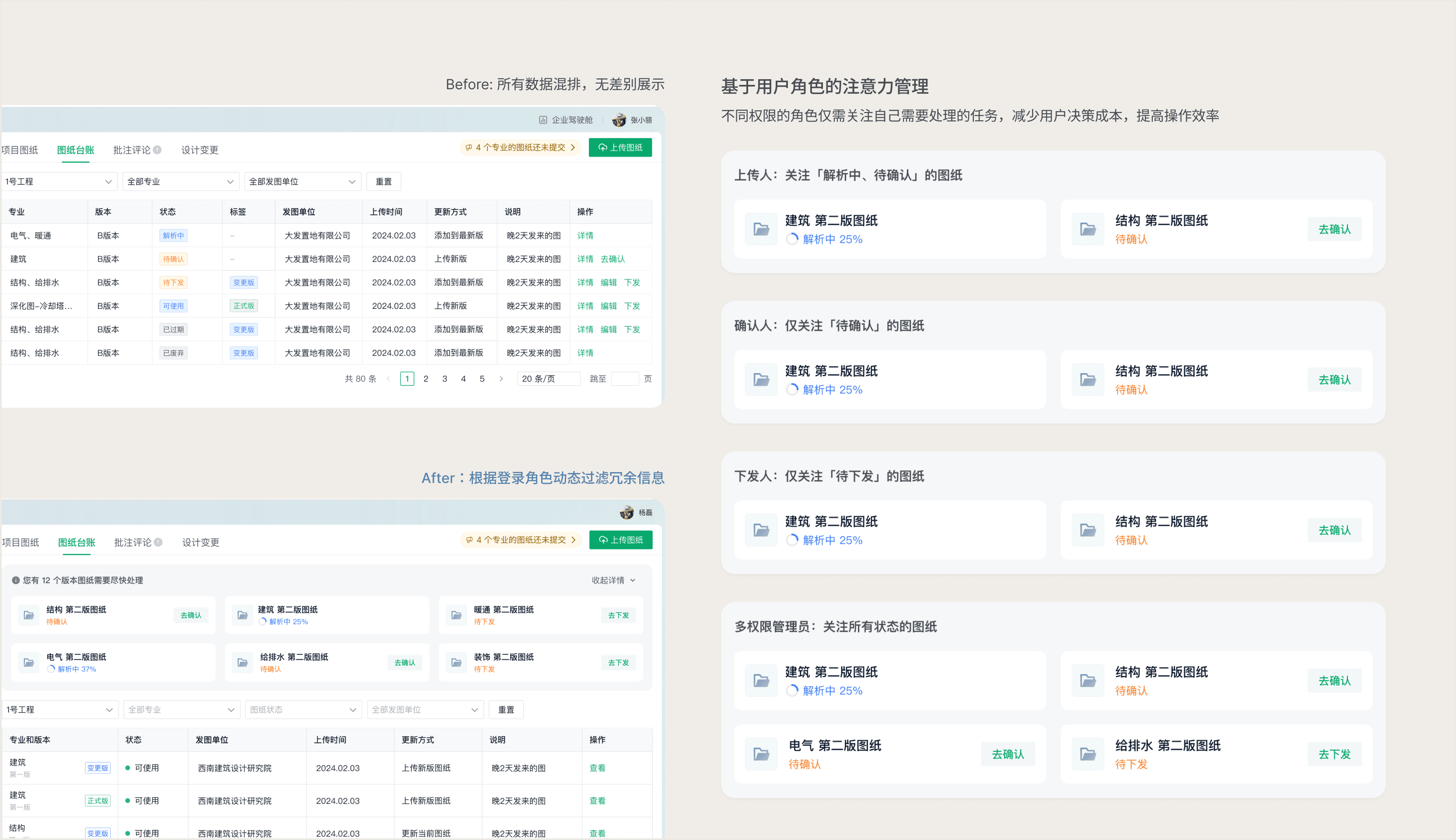
Upgrade from a static list to a dynamic task-driven view, extracting core tasks based on role permissions and distributing business data on demand.
Strategy 3: Unified interaction rules
Translate drawing state transition rules into front-end interaction constraints, defining visibility and disabled states to intercept unauthorized operations before they happen.
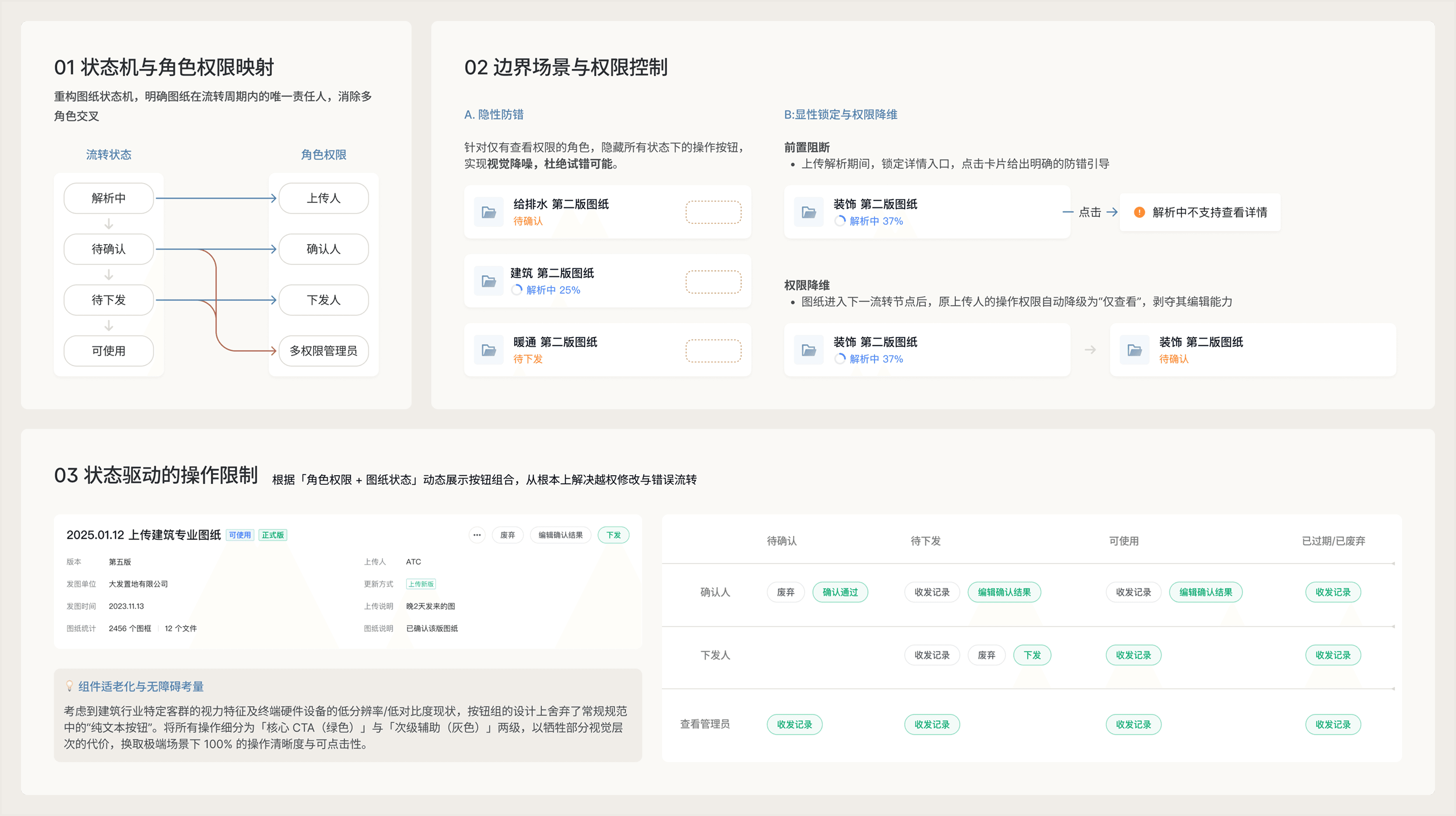
Details
Design is all about detail
Task Area and Table Sync
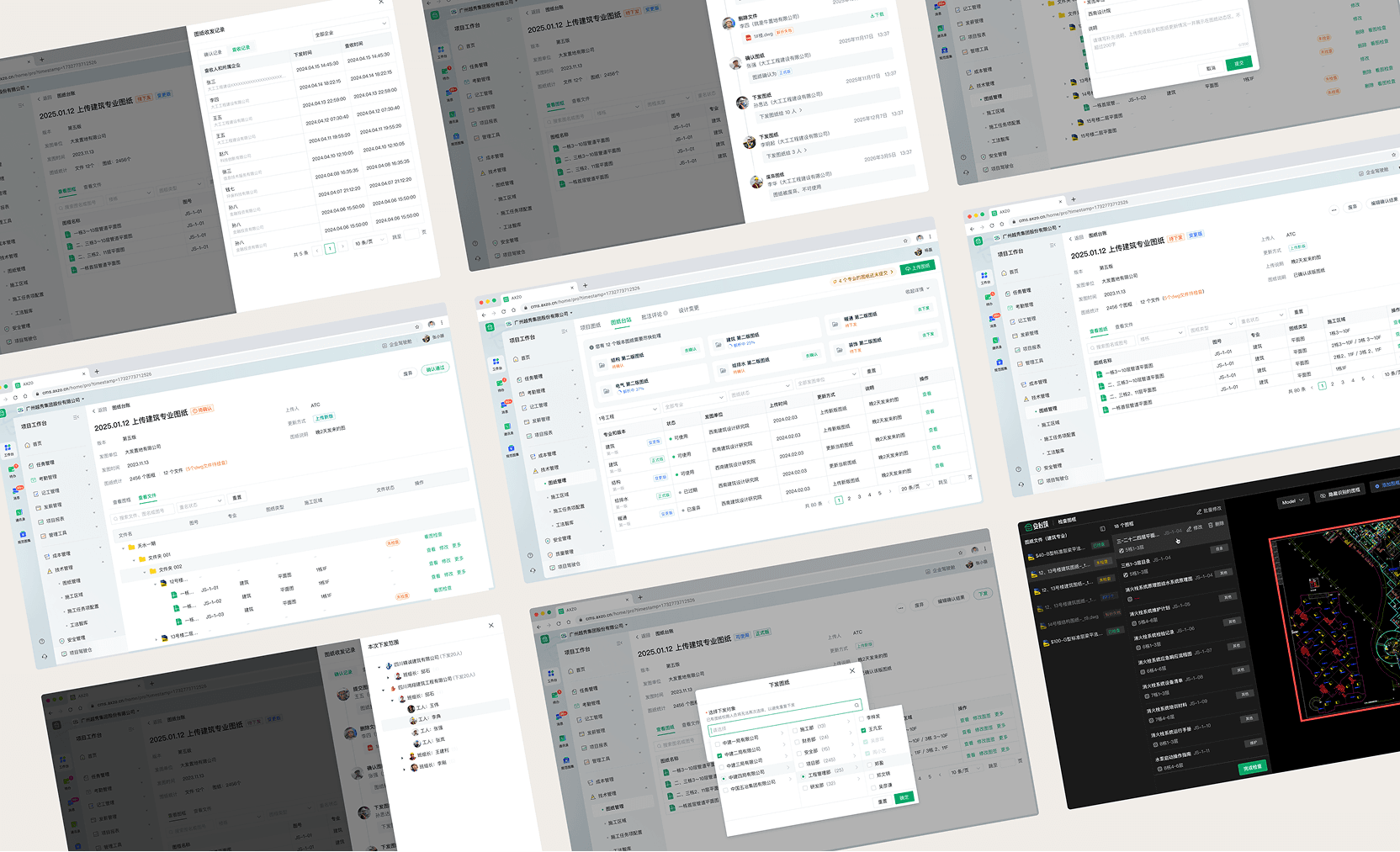
Dynamic layout support: after the releaser sends a version drawing to the corresponding organization and people, it automatically moves from the task area into the table below and appears at the top, aligning with the interaction model of a transfer component.

Responsive Design
To create a smooth user experience, I defined how the task area should be displayed across screen sizes.
Layout rules:
- Let X = viewport width - 290px sidebar width (64 + 226).
- When X is in the [1024px, 1280px) range, show 3 columns.
- When X is in the [1280px, 1920px] range, show 4 columns.
- When X is in the (1920px, 2048px] range, show 5 columns.
- When X is wider than 2048px, lay out cards horizontally at 360px each and wrap automatically.
- Card size: minimum width 300px, no maximum width, fixed height 65px.

Results
The data is based on old/new process comparison, small-sample task walkthroughs, and usability testing, used to validate improvements in state recognition, key-node handling, and task transition efficiency.
核心状态识别耗时
降低25%
关键节点处理时长
待确认
降低15%
待下发
降低12%
任务流转效率
提高8%
Business Background
The drawing register is the space within the drawing management module that records how drawings move through their full lifecycle, from upload to deprecation. The register mainly involves four user roles: uploader, confirmer, releaser, and multi-permission administrator.
Version 1.0 of the drawing register had already been completed before I joined the team. At that stage, the core goal was to quickly build and launch the essential functionality, so the experience was not differentiated by role. As a result, the page was harder to understand, operation paths were longer, and drawing circulation efficiency was significantly affected.
Problem Definition
The old register was essentially a static data container, and it mainly had two problems:
- All users saw the same data, so they also saw unrelated disciplines and versions, which created visual noise.
- With large amounts of drawing data, each role had to find what they cared about like searching for a needle in a haystack.
Design Goals
The core goal of this redesign was to shift the register system from being data-centered to being role- and task-centered.
Design Practice
Once it was clear that the v2 register needed to be reorganized around role-specific permissions, I started exploring solutions before the project officially kicked off.
Design Analysis
According to JTBD, users are not buying the product itself; they are hiring it to complete a task. So which users is the drawing register really helping, and what tasks are they trying to complete?
Round 1: Bold redesign and real-world constraints
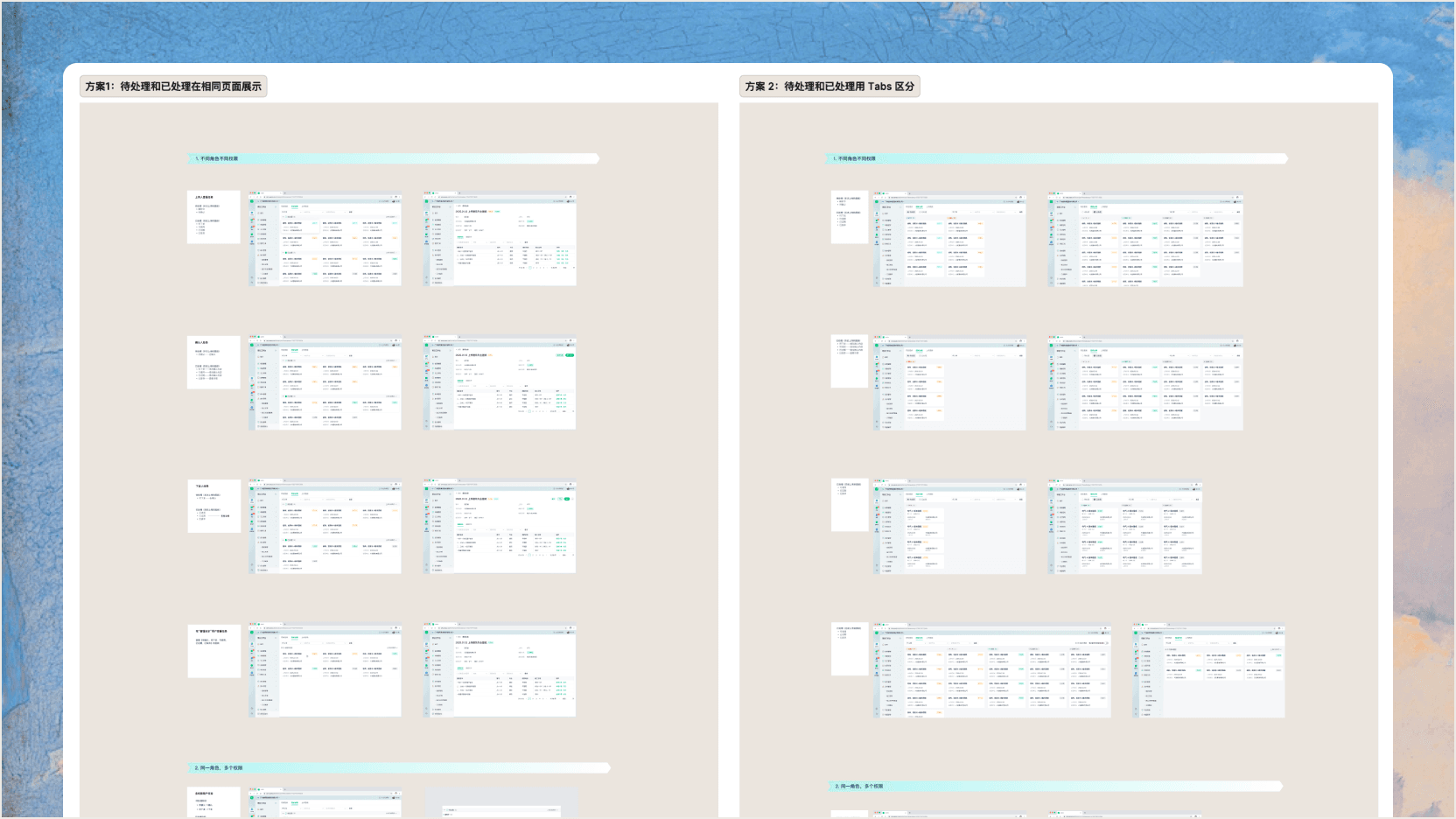
After clarifying the user's functional needs, I first tried a task-management model and split the problem into pending vs. processed states to reshape the register experience.
- Pending tasks: cover what users care about most right now
- Processed tasks: cover historical content users care about next
The first round is shown below using the uploader role as an example.

Option A
Pros
- Pending and processed content are clearly separated at a glance.
- Supports time-based sorting across drawings in different states.
Cons
- When too many pending items exist, the layout degrades and processed items can get pushed below the fold, requiring manual expand/collapse.
- Vertical space is tight, so each card can only carry key information and not too many fields.

Option B
Pros
- Clearer module separation while avoiding the incomplete data display problem from Option A.
- Enough vertical space for detailed information, and the card height can scale as needed.
Cons
- When pending data is sparse, the page feels empty.
- Splitting pending and processed content weakens context, makes the card jump between zones more obvious, and raises comprehension cost.
Internal review feedback
This solution hit resistance in design review, mainly around user acceptance and implementation feasibility.
User side
- When handling massive amounts of drawings, users care more about dense data comparison and the sense of control that table-based interfaces provide.
- B2B users rely on familiar interfaces; a major redesign increases learning cost and lowers acceptance.
Engineering side
- The proposal required a broad underlying refactor, which meant high engineering cost and harder rollout.
Round 2: Practical agile design
Based on the first-round feedback, I abandoned the full rewrite and switched to incremental enhancement. A combined task-area + table view kept the dense table while surfacing each role's most important tasks at the top.
- Keep the table:Preserves user habits and the retrieval efficiency needed for large-scale data.
- Add a task area:Delivers the core 'different users, different views' strategy by placing each role's most important content in the most visible spot.
- Engineering-friendly:Minimizes interface change cost, avoids a full backend rewrite, and improves ROI.

Design Polish
The second-round solution passed internal review smoothly when shared with the team. From there, I kept refining the page hierarchy, field presentation, and actions.

Details
Design is all about detail.
Task area logic
Role-based attention management: each permission level only needs to focus on the tasks it must handle, reducing decision cost and improving efficiency.
Uploader: focus on drawings in processing and awaiting confirmation

Approver: focus only on drawings awaiting confirmation

Releaser: focus only on drawings awaiting release

Multi-role user: focus on drawings in all states

Workflow logic
Supports dynamic layout: once a version drawing is released, it flows from the task area into the table below and appears at the top of the table, which more closely matches the mental model of a transfer component.
Responsive design
To create a smoother experience, I defined how the task area should behave at different screen widths.
Layout rules:
- Let X = viewport width - 290px sidebar width (64 + 226).
- When X is in the [1024px, 1280px) range, show 3 columns.
- When X is in the [1280px, 1920px] range, show 4 columns.
- When X is in the (1920px, 2048px] range, show 5 columns.
- When X is wider than 2048px, lay out cards horizontally at 360px each and wrap automatically.
- Card size: minimum width 300px, no maximum width, fixed height 65px.
Mobile design
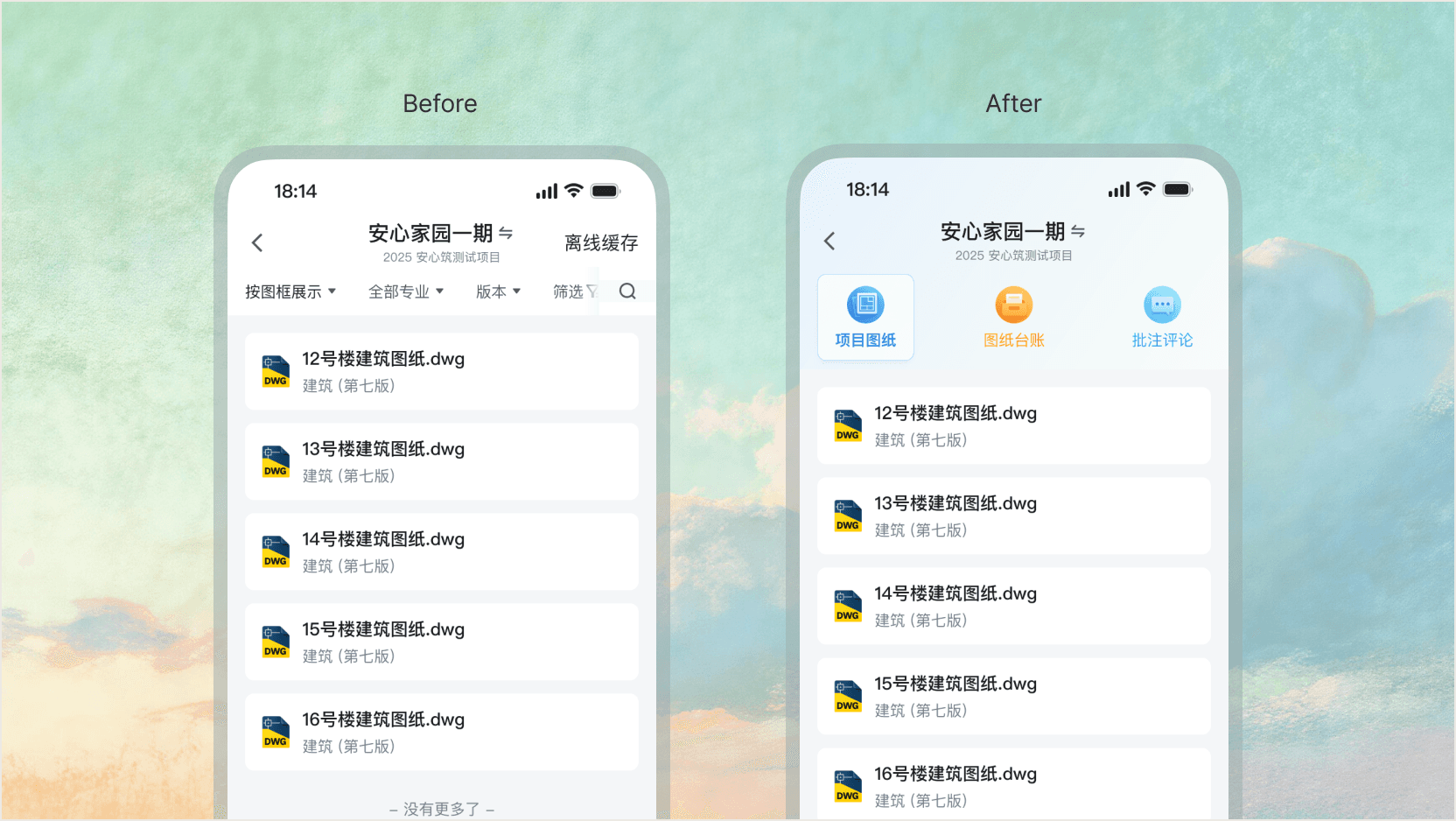
In its early stage, the drawing register focused on the web experience while mobile capabilities lagged behind for a long time. As on-site viewing, drawing confirmation, and task follow-up scenarios increased, the 2.0 redesign needed to complete key mobile capabilities and create a consistent experience across web and mobile.
Design goals
Visual experience upgrade
Improve interface quality and drawing readability while preserving efficiency.

Complete mobile capability
Support key mobile tasks such as confirmation, release, and viewing.

Design exploration
The drawing module contains four major subfunctions: Project Drawings, Drawing Register, Comment Markups, and Design Changes. The core task during exploration was to define a visual entry pattern for each module.
Competitive analysis
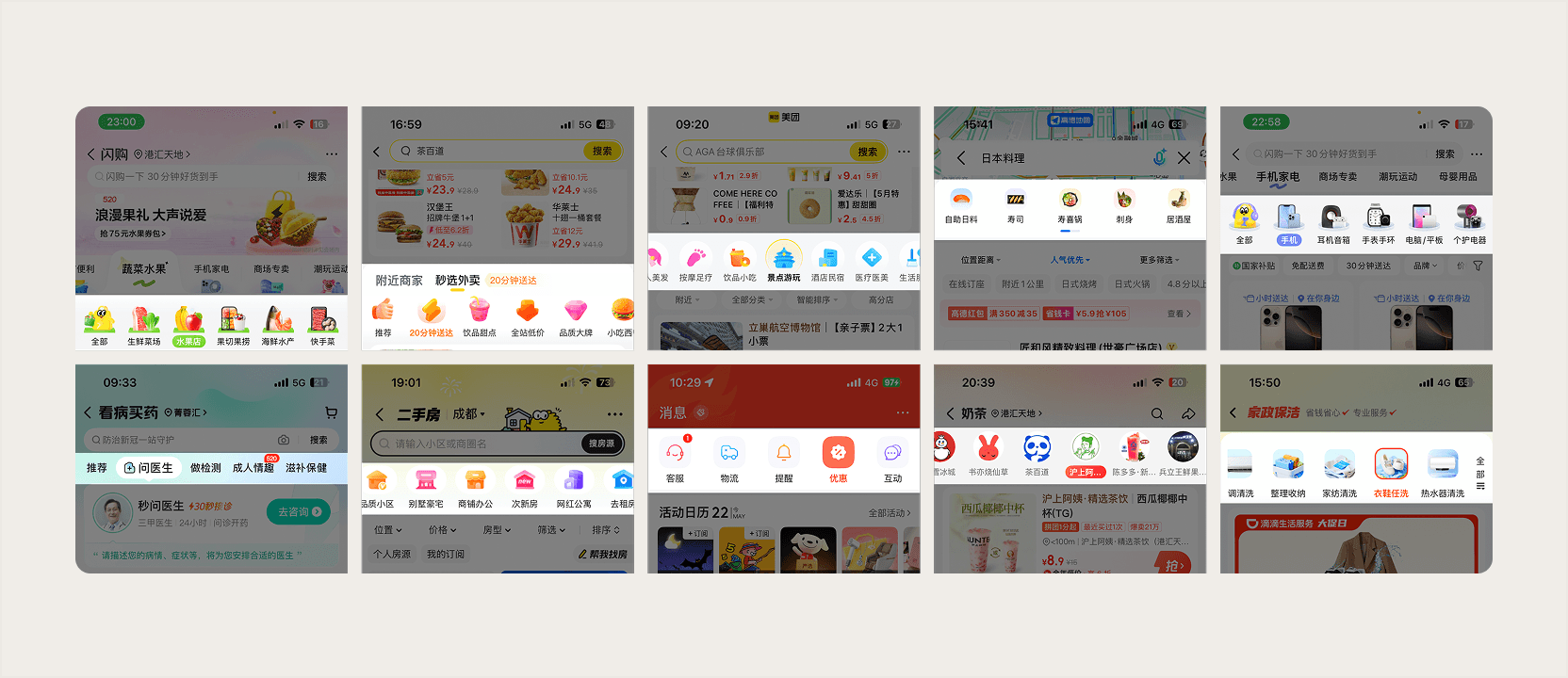
Before concept design, I collected mainstream app entry patterns as case studies. Three typical expressions stood out:
- Minimal modern line icons
- Modern soft skeuomorphic icons
- Product-photo icons
AI-assisted design
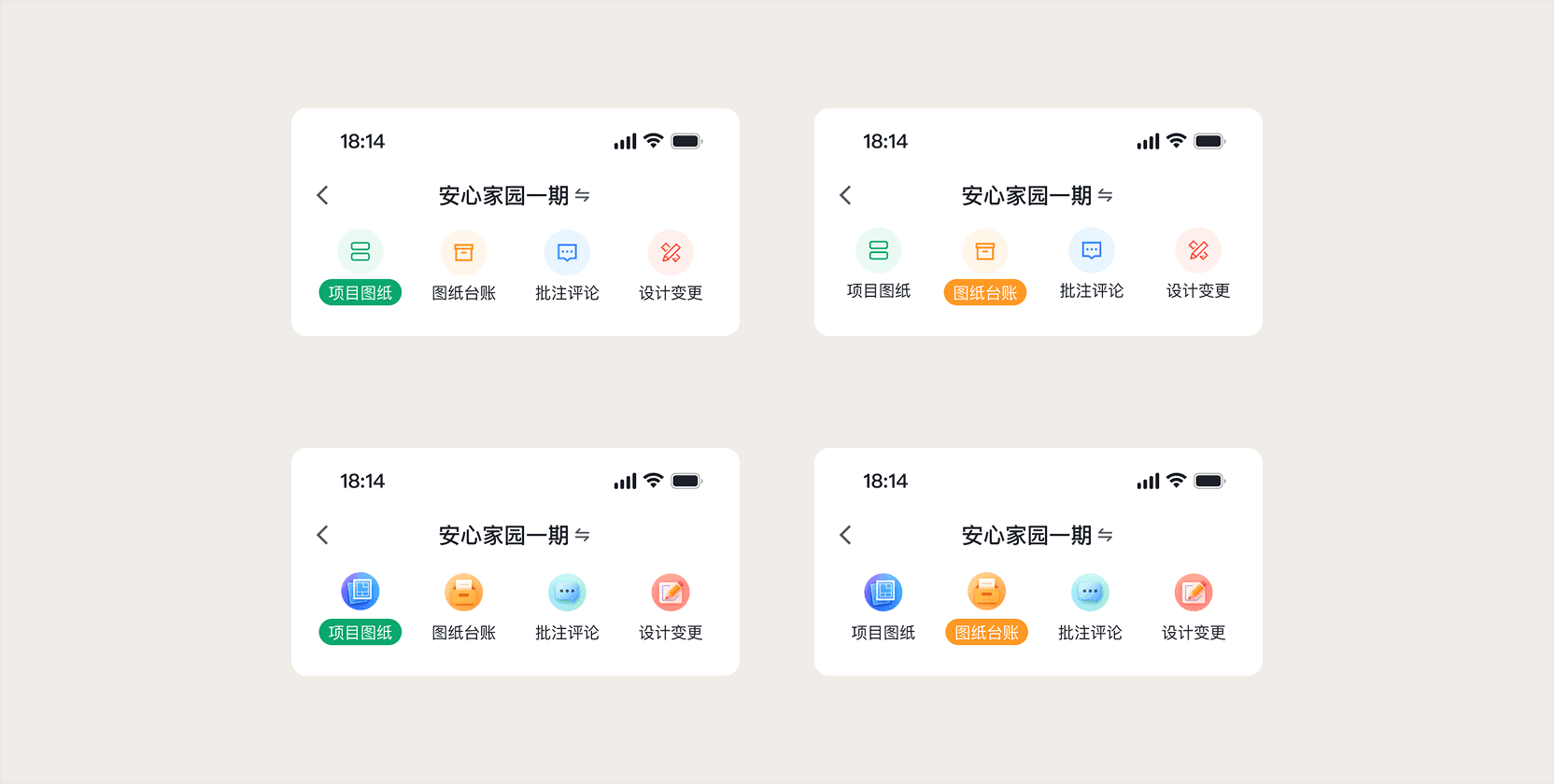
Given the drawing-oriented nature of the product, I quickly ruled out product-content entries and started exploring line-icon and soft skeuomorphic directions.
While exploring soft skeuomorphic entries, OpenAI had just released GTP4o and Ghibli-style visuals were everywhere on social media. Combining 4o's image-generation ability with the modern soft-skeuomorphic icon style used in Quark, I quickly finished this exploration direction.
Design iteration
After the first sync, the team quickly decided on the GPT-4o-generated soft skeuomorphic direction. But GPT-4o's output consistency was still too poor at the time. After multiple failed tries, I used the project drawings as reference and hand-drew the remaining icons.
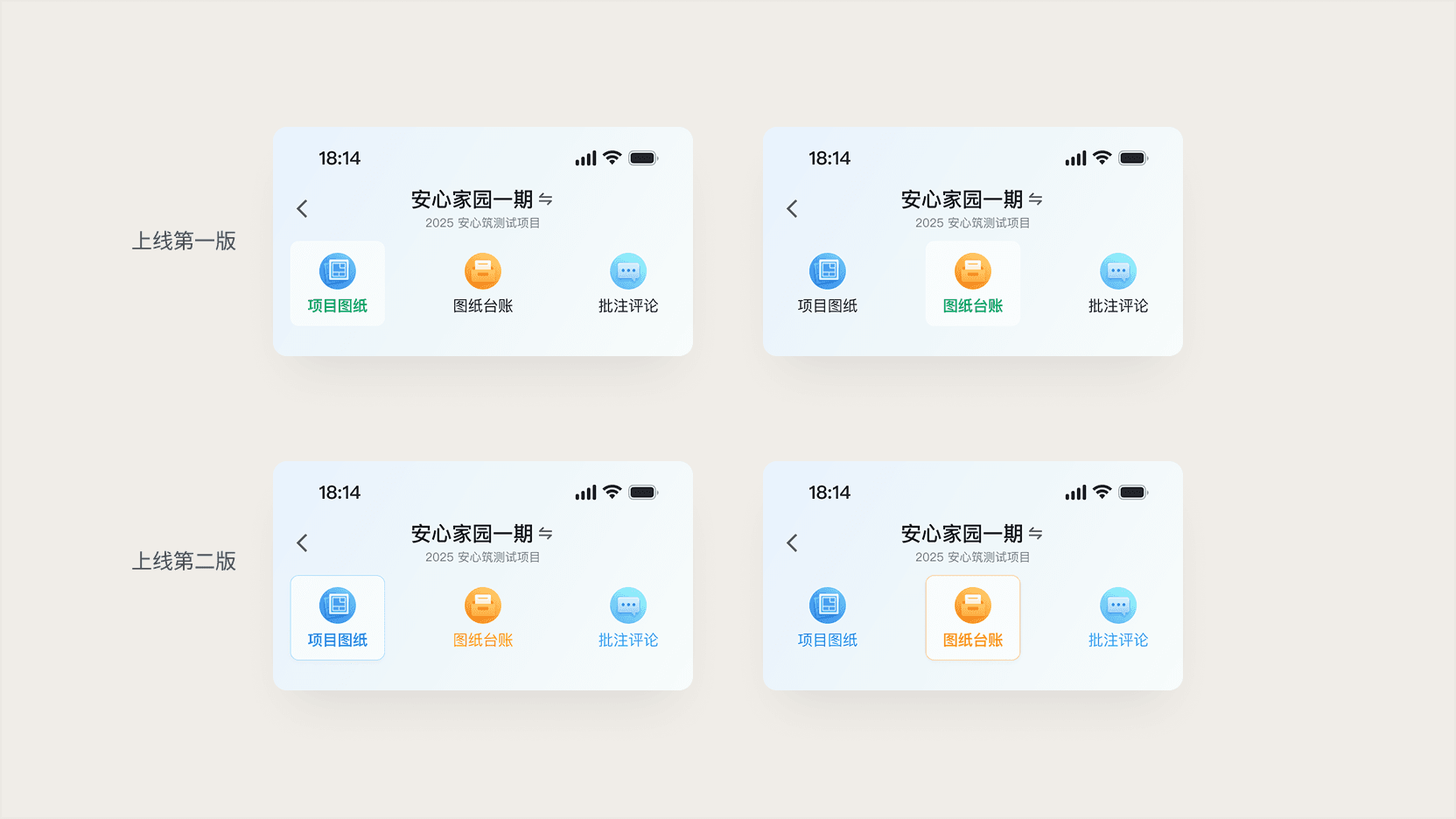
After the first visual version launched, users reported that the selected state was still not very clear under bright outdoor light, so I iterated on a second version.
Visual design iteration
Swipe-up interaction
By default, the visual tab style affects the content shown below. To improve content efficiency on each module homepage, I designed a top-tab expand/collapse interaction: when the card list scrolls upward, the top tab and task area collapse; when the user scrolls downward, the top tab expands again.
Final delivery
Core app pages of the drawing module

Reflection
Good B2B design is not necessarily a disruptive rewrite. This project showed me how to solve complex pain points through clever add-on design without breaking users' existing mental models, while also saving valuable engineering resources.